
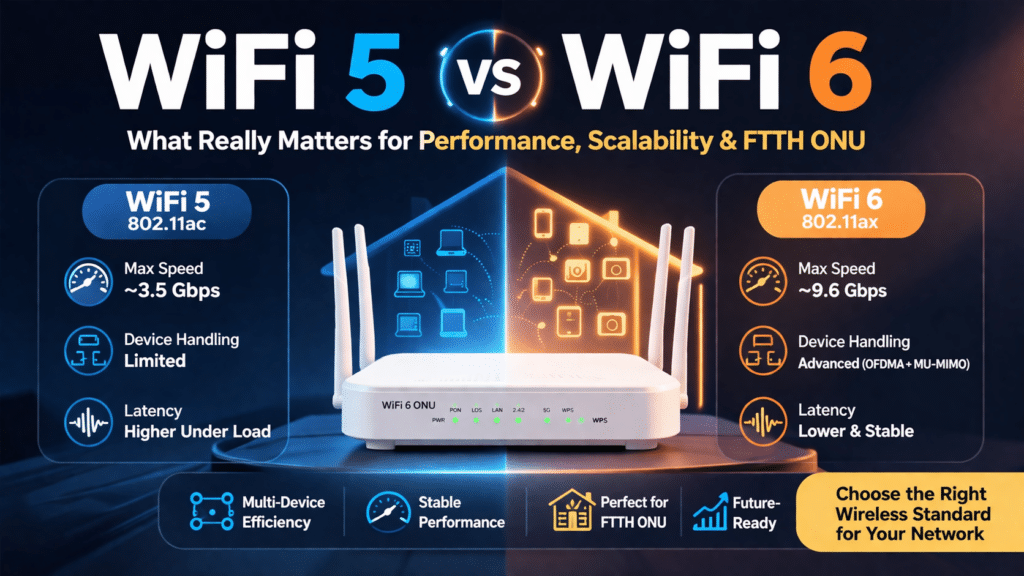
Introduction: Why WiFi Standards Matter Today
WiFi is no longer just about speed. In today’s networks, what matters most is how well your system can handle many devices. It should keep connections stable and deliver consistent performance.
With smart homes, office networks, and FTTH (Fiber-to-the-Home) deployments growing fast, many people are asking a simple question:
Is upgrading from WiFi 5 (802.11ac) to WiFi 6 worth it?
The answer depends on how you use your network—but in many cases, WiFi 6 not only runs faster, it also works smarter.
WiFi 5 vs WiFi 6: Two Different Design Philosophies
In small setups, WiFi 5 still works perfectly fine. It can handle:
- Video streaming
- Web browsing
- Basic office work
But as more devices connect, problems start to show:
- Slower response times
- Network congestion
- Unstable connections during peak hours
This is because WiFi 5 lets devices compete for bandwidth, rather than organizing how they communicate
How WiFi 6 Improves Network Performance
Smarter Bandwidth Sharing (OFDMA)
WiFi 6 uses orthogonal frequency division multiple access (OFDMA) to split channels into smaller parts.
This allows multiple devices to send and receive data at the same time instead of waiting in line.
The result:
- Less delay
- Smoother performance
- Better use of available bandwidth
Better Multi-Device Communication (MU-MIMO)
WiFi 6 improves multiple input multiple output (MIMO) by allowing communication in both directions.
This means:
- The router can talk to multiple devices at once
- Devices don’t need to wait as long
- Overall performance feels faster and more stable
More Stable Connections
Instead of letting devices randomly compete, WiFi 6 organizes how data is transmitted.
This helps:
- Reduce signal conflicts
- Keep connections stable
- Improve overall user experience
WiFi 5 vs WiFi 6: Key Technical Differences
| Feature | WiFi 5 (802.11ac) | WiFi 6 |
|---|---|---|
| Max Speed | Up to ~3.5 Gbps | Up to ~9.6 Gbps |
| Frequency Bands | 5 GHz | 2.4 GHz + 5 GHz |
| Device Support | Limited | Handles many devices smoothly |
| Network Performance | Good for small setups | Strong in busy environments |
| Latency | Can increase under load | Lower and more stable |
| Bandwidth Usage | Less efficient | More efficient |

Why WiFi 6 Feels Faster in Real Use
Even if your internet speed stays the same, WiFi 6 often feels faster.
That’s because it:
- Reduces lag during video calls
- Keeps streaming smooth
- Handles multiple users without slowdown
- Maintains stable speeds across devices
It’s not just about higher speed—it’s about consistent performance.
WiFi 5 vs WiFi 6 in FTTH and ONU Deployments
In FTTH networks, fiber can deliver very high speeds—but WiFi is what users actually experience.
If you use a WiFi 5 ONU, you may run into:
- Slower performance with multiple users
- Uneven speeds across devices
- Reduced overall experience
WiFi 6 ONUs solve this by:
- Distributing bandwidth more effectively
- Supporting more connected devices
- Keeping performance stable
For ISPs, this means:
- Better user satisfaction
- Fewer support issues
- Stronger long-term customer retention
When Should You Choose WiFi 5 or WiFi 6?
Your choice should depend on how your network is used:
| Scenario | Recommended Option | Why |
|---|---|---|
| Small home (≤10 devices) | WiFi 5 | Affordable and sufficient |
| Smart home / many devices | WiFi 6 | Handles more connections |
| Office environment | WiFi 6 | Better stability and lower delay |
| FTTH deployment | WiFi 6 ONU | Matches high-speed fiber |
| Budget-focused setup | WiFi 5 | Lower upfront cost |
FC2104C – XPON ONU WiFi5 AC1200 ONT Router
FC3004X – XPON ONU WiFi6 AX3000 ONT Router
Cost vs Long-Term Value
WiFi 6 devices usually cost more at the beginning, but they often save money over time.
Why?
- Fewer performance issues
- Less need for upgrades
- Better support for future devices
For growing networks, WiFi 6 is a smarter long-term choice.
Common Misunderstandings About WiFi 6
“WiFi 6 is only about speed”
→ It’s really about handling more devices and keeping performance stable
“I don’t need it for a small network”
→ Even homes now have many connected devices
“WiFi 5 is outdated”
→ Not true—it still works well for simple setups
Conclusion: Which One Should You Choose?
WiFi 5 is still a solid option for small and simple networks.
But if your network includes multiple users, smart devices, or high-speed fiber, WiFi 6 is the better choice.
It’s not just an upgrade—it’s a better way to handle modern network demands.
Frequently Asked Questions (FAQ)
Is WiFi 6 worth upgrading from WiFi 5?
Yes, especially in environments with multiple connected devices. While WiFi 5 provides sufficient speed for basic usage, WiFi 6 significantly improves efficiency, reduces latency, and delivers more stable performance under heavy network load, making it a better long-term investment.
Does WiFi 6 increase internet speed?
WiFi 6 does not necessarily increase your internet plan speed, but it improves how efficiently bandwidth is used. This results in better real-world performance, especially when multiple devices are connected simultaneously.
What is the main difference between WiFi 5 and WiFi 6?
The main difference lies in efficiency and device handling. WiFi 5 focuses on higher throughput for individual devices, while WiFi 6 is designed to support multiple devices simultaneously with lower latency and better stability.
Do I need a WiFi 6 ONU for FTTH networks?
If you are deploying or upgrading fiber broadband services, a WiFi 6 ONU is recommended. It ensures better utilization of high-speed fiber bandwidth and provides a more consistent user experience across multiple devices.
Is WiFi 5 still relevant in 2026?
Yes, WiFi 5 is still suitable for small networks with limited devices and basic usage needs. However, for future-proofing and growing network demands, WiFi 6 is the better choice.